E Learning Application Development: Must-Have Features and Development Cost
Updated 25 May 2026
17 Min
2760 Views
E-learning app development in 2026 has become a strategic investment for both businesses and educational institutions. The industry continues to grow as corporate L&D budgets shift into digital learning ecosystems, hybrid K-12 education has become a long-term standard, and AI-driven personalization remains one of its strongest trends. For companies, that investment pays off in lower training costs and higher learner engagement.
Cleveroad has developed e-learning solutions since 2011, helping startups and enterprise organizations launch scalable digital education products. Our in-house development team includes 280+ engineers with hands-on expertise in EdTech architecture, AI integrations, cloud infrastructure, and compliance-focused development. Drawing on that experience, this article explains how to develop an e-learning app in 2026, which features matter most, how AI is changing modern learning products, and how much it costs to build one.
Key takeaways:
- The global online learning market continues to grow due to hybrid education models, remote workforce training, and AI-powered learning experiences
- Modern e-learning mobile app development includes AI personalization, analytics dashboards, gamification, live streaming, and microlearning functionality
- Healthcare, corporate training, K-12, language learning, and education app platforms for creators remain the fastest-growing e-learning segments
- The average cost of mobile app development in 2026 ranges from $40,000 for an MVP to $250,000+ for enterprise-grade platforms
- Choosing experienced app developers with EdTech expertise reduces risks related to scalability, compliance, and UX during product launch
What Is an E-Learning Application
An e-learning application is a digital platform that delivers structured online education through web, mobile, or cross-platform experiences. These solutions help organizations and businesses deliver a learning environment with built-in progress tracking and automated assessments.
Recent research published in the ASEAN Journal of Educational Research and Technology shows that modern learning paths improve accessibility, flexibility, and learner engagement across different educational models. They support far more than video lessons. In 2026, e-learning app development trends include AI-based recommendations, gamification, live collaboration, and analytics dashboards. The exact app features depend on the audience and business model behind the platform.
Five user groups e-learning apps serve
The structure and functionality of an e-learning platform depend heavily on who will use it. Each audience interacts with the system differently and expects tools tailored to specific learning, teaching, or management tasks. Defining user groups at the start of e learning app development helps businesses build a platform that supports real workflows instead of generic functionality.
Students
Need flexible access to lessons, quizzes, assignments, and progress tracking across desktop and mobile devices.
Educators and tutors
Require tools for course creation, live teaching, learner assessment, grading, and communication management.
Parents
Expect visibility into student performance, attendance, assignment completion, and learning outcomes.
Corporate L&D teams
Use top e-learning platforms to onboard employees, manage certifications, automate compliance training, and measure workforce development.
Individual course creators
Need monetization tools, audience analytics, content hosting, and marketing functionality to sell course materials online.
Common types of e-learning applications
The e-learning market includes several product categories, each designed for different audiences, business models, and educational goals. Understanding these formats helps businesses choose the right platform structure before development starts.
- LMS for institutions: Platforms designed for schools, universities, and academies to manage courses, assignments, grading, and student records. Examples: Moodle and Canvas.
- Corporate e-learning platforms: Solutions focused on employee onboarding, compliance training, skills development, and certification management. Examples: Docebo and LinkedIn Learning.
- Course marketplaces: Platforms where instructors publish and monetize courses for large online audiences. Examples: Udemy and Coursera.
- Virtual classrooms: Applications that support live online education through video conferencing, file sharing, chat, and collaboration features. Examples: Zoom for Education and Google Classroom.
- Language learning apps: Mobile-first solutions focused on vocabulary retention, speaking practice, and gamified learning flows. Examples: Duolingo and Babbel.
- Microlearning apps: Platforms that deliver short-form learning content optimized for fast knowledge consumption and retention. Examples: Blinkist and Quizlet.
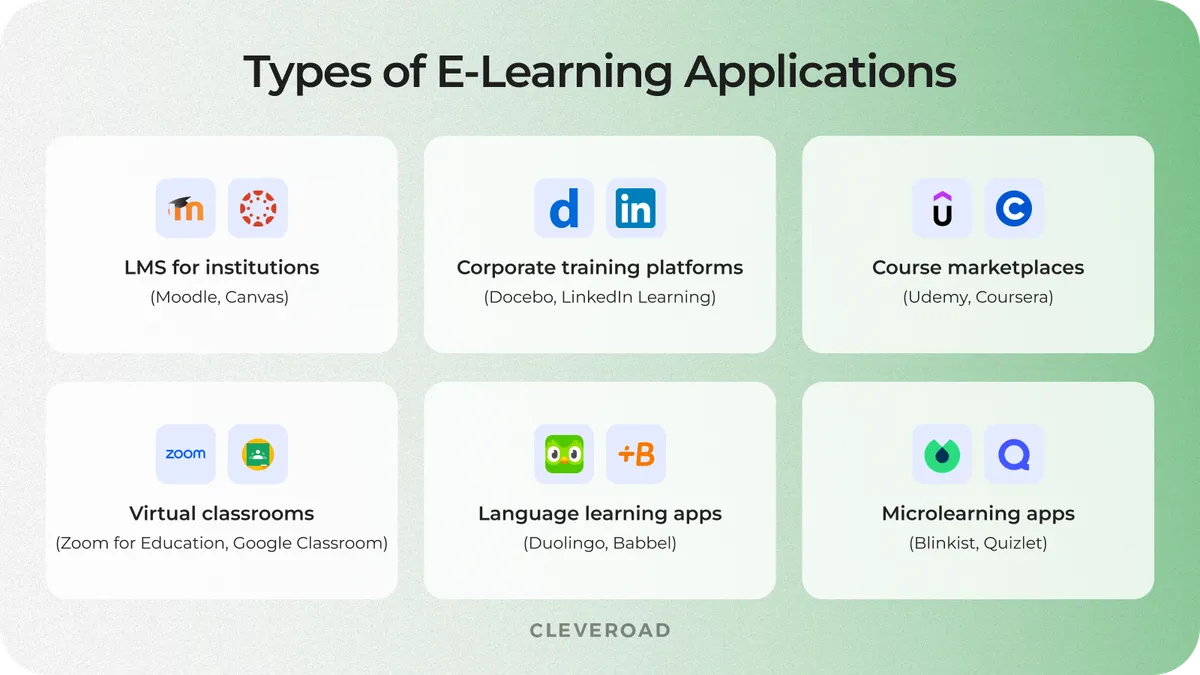
Types of e-learning applications
Must-Have Features for an E-learning App
An e-learning app includes multiple interconnected environments for students, instructors, parents, and administrators. Each audience requires dedicated functionality, user flows, and interaction models to ensure efficient learning management and long-term platform growth.
Student-facing features
Student-facing features help learners access content, stay engaged, and track their progress across devices and learning formats.
- Course catalog with smart filtering. Students need fast access to relevant courses. Filters by topic, skill level, language, duration, certification, and instructor help users quickly find suitable learning programs.
- Content viewer for multiple formats. The development of an e-learning application should support video lessons, audio materials, PDFs, quizzes, presentations, and interactive exercises within a single interface.
- Progress tracking dashboard. Learners should see completed lessons, quiz scores, certificates, streaks, and upcoming tasks in real time.
- Push notifications and reminders. Notifications help students return to unfinished lessons, attend live classes, and complete assignments before deadlines.
- Offline download support. Users should be able to access lessons without an internet connection. This feature improves mobile learning and supports users in low-connectivity regions.
- Gamification features. Badges, leaderboards, achievement systems, and learning streaks help enhance the learning experience and improve course completion rates.
- Social login. Google, Apple, Facebook, and LinkedIn sign-in options reduce friction during onboarding.
Modern e-learning platforms increasingly use AI-driven personalization, adaptive learning flows, and mobile-first engagement mechanics to improve retention and keep users actively involved. The student-facing features below:
- AI-powered course recommendations. AI algorithms analyze user behavior, completed lessons, and learning goals to recommend relevant educational content.
- Microlearning module support. Short-form lessons improve retention and better support mobile learning habits. Many platforms now use 5 to 10-minute educational sessions.
- Adaptive quiz difficulty. AI-driven assessments can automatically adjust question complexity based on student performance and individual learning pace.
Instructor and tutor features
Instructor and tutor features help educators create content, manage students, and automate repetitive teaching workflows.
- Course creation tools. Teachers should be able to upload videos, create quizzes, organize modules, and publish lessons without technical expertise.
- Content library management. Instructors need centralized storage for reusable presentations, assignments, templates, and media assets.
- Student progress dashboards. Tutors should monitor attendance, assignment completion, quiz performance, and overall learning activity in one place.
- Video conferencing integration. Live learning often requires integrations with Zoom, Twilio, or Agora SDK for webinars, tutoring sessions, and virtual classrooms.
- Assignment grading tools. Teachers should review submissions, leave feedback, and manage grading workflows directly within the platform.
- In-app messaging. Built-in communication tools improve collaboration between learners and instructors without relying on external apps.
AI-powered automation and accessibility tools help educators save time, personalize learning, and scale content delivery more efficiently. These are features for instructors:
- AI grading assistance for free-form answers. Modern e-learning systems can help instructors evaluate essays and long-form responses faster while preserving human review.
- Automated transcription. AI transcription converts recorded lessons into searchable text and subtitles, improving accessibility and content navigation.
- GenAI-assisted content creation. Generative AI tools help instructors create quizzes, summaries, lesson drafts, and personalized learning materials faster.
Parent features
Many e-learning platforms overlook the parent experience, even though this role is critical for K-12 education, tutoring apps, and family-focused learning products.
- Child progress dashboard. Parents should be able to see grades, completed lessons, attendance, and learning milestones in a simple visual format.
- Attendance tracking. The platform can notify parents of missed lessons, periods of inactivity, or low participation rates.
- Communication with teachers. Messaging and feedback channels improve coordination between parents and educators.
- Payment management. Parents should manage subscriptions, invoices, and recurring payments directly inside the application.
- Content access controls. Parental controls help manage screen time, restrict specific materials, and approve learning activities for younger students.
Admin panel features
The admin panel helps platform owners manage users, monitor system performance, maintain compliance, and control day-to-day business operations.
- User and role management. Admins should control permissions for students, teachers, parents, moderators, and support teams.
- Content moderation. This functionality helps review uploaded materials, user-generated content, and discussion activity.
- Payment and subscription management. Administrators need tools to manage pricing plans, discounts, refunds, and billing workflows.
- Reporting and analytics. Dashboards should track engagement, retention, course popularity, revenue, and overall user activity.
- System configuration tools. Admins need access to platform settings, localization, integrations, and notification management.
- GDPR and FERPA data controls. Education platforms must support compliance with student privacy and data protection regulations.
Modern e-learning systems increasingly rely on analytics and experimentation tools to improve retention, optimize content, and support data-driven growth decisions. These advanced admin features:
- Usage analytics dashboards. Advanced analytics help identify drop-off points, engagement trends, and content performance across different user segments.
- A/B testing framework for educational content. Platforms increasingly test lesson formats, onboarding flows, and assessment types to improve learning outcomes and retention rates.
- Predictive engagement monitoring. AI models can identify users at risk of dropping out and help administrators launch retention campaigns earlier.
- Automated compliance reporting. Smart reporting tools simplify audit preparation and help monitor GDPR, FERPA, and internal policy compliance across the platform.
Step-by-Step Process to Build an E-Learning Application
The app development process for e-learning platforms typically includes discovery, design, development, testing, validation, and long-term support. To develop an e-learning app without costly mistakes, follow these essential steps from product planning to launch.
Step 1. Validate the idea
E-learning application development should begin with idea validation to reduce the risk of building a product that lacks market demand or sustainable monetization potential. At this stage, companies either conduct discovery internally or work with a product consulting partner to confirm market demand and avoid investing in a weak product concept.
Start with market research to understand whether your idea has enough demand and long-term business potential. Analyze current e-learning trends, monetization models, and audience behavior to evaluate market opportunities. Next, study your target users to identify their learning habits, pain points, and expectations. Interviews, surveys, and discovery sessions can help you understand what users actually need and what they are willing to pay for. Finally, analyze your competitors to see which features, onboarding flows, and pricing strategies already exist in the market. This helps you identify gaps, avoid weak product decisions, and define your competitive advantage.
Early demand validation measures whether real users are willing to engage with the product before development begins.
By the end of this stage, companies usually reach one of two outcomes:
- The product idea shows sufficient market demand to justify Minimum Viable Product (MVP) development, allowing the company to launch a basic version of the platform with core functionality to validate real user demand before investing in full-scale development.
- The concept requires repositioning or further validation before investing in full-scale development
This decision should happen before investing in production-level software development.
Need an experienced partner for LMS, mobile learning, or AI-powered education software? Explore Cleveroad's eLearning software development services
Step 2. Define the target audience and the learning model
Before moving into design and development, define who your platform is built for and how users will consume educational content. Your target audience may include K-12 students, corporate teams, or individual learners, each with different expectations, engagement patterns, and monetization logic.
Next, choose the learning model that best fits your product goals. This may include live classes, self-paced learning, recorded lessons, cohort-based programs, or microlearning sessions. These decisions directly affect platform functionality, UX design, content structure, and the long-term success of a successful e-learning product, so mistakes at this stage often lead to expensive changes later.
Step 3. Choose a development vendor
Choosing experienced app developers directly affects product quality, scalability, delivery speed, and long-term maintenance costs. At this stage, you should evaluate vendors based on their EdTech expertise, communication processes, and experience with complex educational platforms.
Start by reviewing the company's portfolio to see whether they have experience building LMS platforms, virtual classrooms, corporate training systems, or other education products similar to your idea. If your platform processes sensitive student or employee data, make sure the vendor understands compliance requirements such as GDPR, FERPA, or SOC 2.
You should also evaluate how the team manages communication and delivery. Reliable vendors usually provide a dedicated project manager, transparent sprint reporting, structured roadmaps, and regular stakeholder updates throughout development.
Finally, check verified reviews on platforms like Clutch and GoodFirms to better understand delivery quality, technical expertise, and experience with long-term collaboration. ISO certifications such as ISO 9001 and ISO/IEC 27001 can also indicate mature quality management and security practices.
Choosing the wrong vendor increases delivery risks and development costs. See how to evaluate potential partners in our guide on how to choose a software development company.
Step 4. Run discovery with the vendor
After choosing a development partner, start the Discovery Phase to turn your idea into a structured implementation plan. During this stage, you work together with the product and engineering team to define user flows, feature priorities, integrations, platform architecture, monetization logic, and compliance requirements.
By the end of discovery, you should receive a validated project scope, a prioritized feature list and a realistic development cost estimate. This stage helps reduce technical and business risks early, since estimates made before detailed analysis are often inaccurate. For most e-learning platforms, the Discovery Phase services take between 2 and 6 weeks, depending on product complexity.
Step 5. Plan MVP scope and feature priorities
At this stage, you and the development vendor define what should be included in the first production release. The vendor usually proposes feature prioritization based on technical dependencies, business goals, and delivery constraints, while the client approves the final priorities.
The main goal of an MVP is to launch a usable product with the minimum feature set required to validate real user demand and business assumptions.
A strong MVP should include only the functionality required to validate your idea, launch faster, and collect real user feedback. Focus on the core learning experience first, including user accounts, course access, content delivery, quizzes, payments, and basic administrative tools. Advanced functionality like AI recommendations, gamification, social learning, or complex analytics can be added later after validating user demand and engagement patterns.
Step 6. Lock the tech stack
Your development partner selects the technology stack based on the MVP scope, scalability needs, integrations, and long-term product plans, then aligns the final choice with you before development starts. Choosing the right architecture early is critical for scalable eLearning app creation.
The final stack should support both the current MVP and future eLearning platform expansion without expensive architectural rewrites.
| Layer | Recommended tools | Why this choice fits e-learning |
Mobile apps | React Native, Flutter, Swift, Kotlin | Supports cross-platform delivery, offline learning, push notifications, and scalable mobile UX |
Web frontend | React, Next.js | Delivers responsive interfaces and fast content rendering for large course libraries |
Backend | Node.js, Python/Django, .NET Core | Handles real-time learning flows, integrations, and scalable business logic |
Database layer | PostgreSQL, MongoDB, Redis, and Elasticsearch | Supports structured learning data, fast search, caching, and flexible content storage |
Video infrastructure | Twilio, Agora, Daily | Enables live classes, webinars, and virtual tutoring sessions |
Payments | Stripe, Braintree, PayPal | Supports subscriptions, course purchases, and international payment processing |
Content standards | SCORM, xAPI | Ensures compatibility with enterprise LMS systems and external learning ecosystems |
Step 7. Map compliance requirements
Compliance planning should begin before active development starts. At this stage, the vendor builds regulatory and security requirements directly into the system architecture, while the client validates that all target-market obligations are covered.
Ignoring compliance in e-learning app development creates serious business risks. Failure to meet accessibility requirements may block enterprise procurement deals, while non-compliant apps can be rejected during App Store or Google Play reviews.
A modern e-learning platform usually needs to address several compliance areas simultaneously. At this stage, you also need to define compliance and accessibility requirements that may affect platform architecture and future development decisions. Common standards and regulations include:
- GDPR for platforms operating in the European Union
- FERPA for US schools and higher education institutions
- COPPA for products targeting children under 13
- WCAG 2.1 AA for accessibility compliance
- SCORM and xAPI for LMS interoperability and learning activity tracking
- HIPAA for healthcare education platforms
- PCI DSS for secure payment processing
These requirements influence authentication, parental controls, analytics, accessibility features, data storage, and content compatibility across the platform.
Step 8. Design and build the platform
Once the requirements and architecture are approved, the project moves into UX/UI design and active development. At the design stage, the focus is usually placed on intuitive learning flows, mobile-first navigation, accessibility, and user engagement across different devices.
After design approval, development starts across several parallel streams, including backend, frontend, admin panels, and third-party integrations. Regular sprint reviews and product feedback sessions help keep the platform aligned with your business goals throughout implementation.
Step 9. Test, launch, and maintain
Before launch, your development partner conducts quality assurance to verify that the platform works correctly across devices, browsers, payment systems, and user scenarios. This stage usually includes functional, security, performance, accessibility, and integration testing before the product is submitted to the App Store, Google Play, and production infrastructure.
After release, the project moves into ongoing support and product improvement. Post-launch maintenance typically includes security updates, infrastructure monitoring, analytics optimization, performance improvements, and feature updates based on real user feedback. Continuous iteration is especially important for e-learning products because learner behavior, compliance requirements, and mobile platforms constantly change.
How Cleveroad Built Real E-Learning Products
Cleveroad has experience building various EdTech solutions, from mobile learning applications and corporate training platforms to large-scale LMS systems for educational organizations and businesses.
Below are real examples of how Cleveroad helped education-focused companies build and modernize digital learning products for different business models and user audiences.
Crossfader: building a DJ training platform with subscription monetization
Crossfader, a UK-based online DJ training company, partnered with Cleveroad to replace its limited WordPress-based platform with a scalable custom learning ecosystem for professional DJ education.
To address the client's business needs, Cleveroad built:
- A scalable web app for structured DJ training programs
- A native iOS development workflow with offline lesson access support
- A custom admin panel for premium content management
- Monthly and annual subscription functionality
- Migration from WordPress to a modern, scalable architecture
The platform was designed to support video-heavy educational content, flexible subscription-based monetization, and faster content-publishing workflows. Offline access became especially important for users practicing music production without stable internet connectivity.
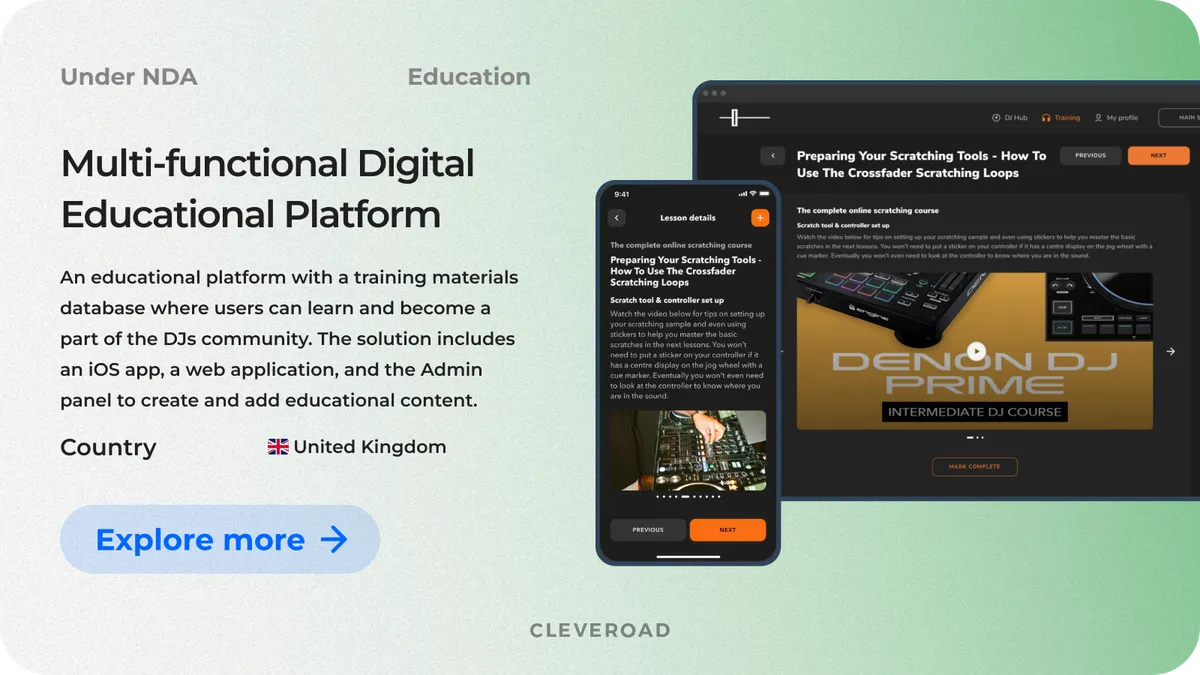
Crossfader DJ training platform built by Cleveroad
As a result, Crossfader received a scalable LMS with new recurring revenue streams, faster content management, and a modern technology stack prepared for future expansion. The platform also allowed users to migrate from the previous WordPress solution to the new web application without losing their learning progress or course data.
This project demonstrates what end-to-end development of an e-learning application looks like when a company outgrows a generic CMS and moves toward a dedicated mobile and web learning platform.
Watch how Jamie Hartley, CEO & Founder at Crossfader, describes their experience working with Cleveroad.
Feedback about cooperation with Cleveroad
Healthcare LMS: building a compliance-heavy LMS for medical education
Cleveroad developed a secure healthcare LMS for medical education organizations that required centralized learning management, certification-preparation workflows, and strict access control.
To address the client's business needs, Cleveroad built:
- A secure LMS for medical education organizations
- Role-based access management for different user groups
- Course and certification program management functionality
- Progress tracking dashboards and assessment workflows
- Integrated testing and exam preparation tools
- Centralized learning workflows for certification preparation
The platform was designed for environments in which compliance and data protection requirements directly affect the system architecture. Medical education products often require secure infrastructure, controlled access to sensitive learning materials, auditability, and long-term scalability.
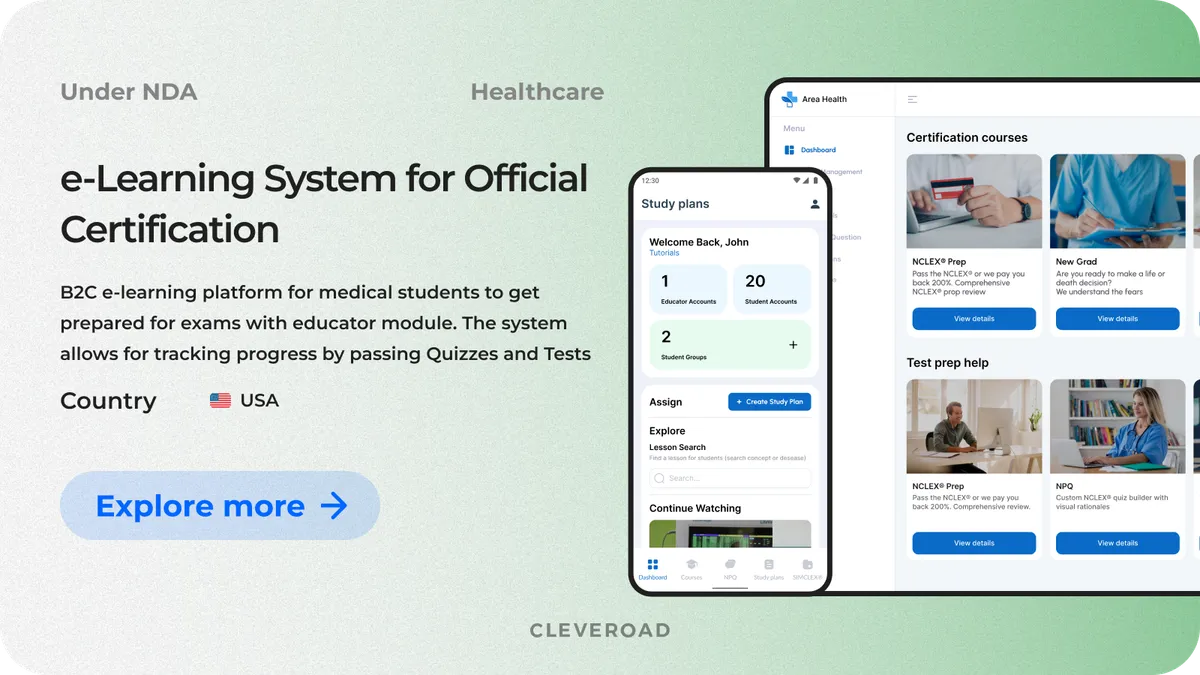
Healthcare LMS for medical education built by Cleveroad
As a result, the client received a scalable healthcare LMS that supports an active learner community, ongoing certification preparation workflows, and secure educational content management. Today, the platform is trusted by more than 350,000 future nurses preparing for professional certification exams.
Cleveroad builds compliance into LMS architecture from day one, including GDPR, FERPA, WCAG, SCORM, and xAPI requirements. Learn more about our custom LMS development services.
eLearning App Development Cost
E-learning app development costs in 2026 usually range from $40,000 for a basic MVP to $250,000+ for a large-scale AI-powered learning platform. The final budget depends on several factors, including platform complexity, supported devices, compliance requirements, video infrastructure, integrations, and the number of user roles included in the product.
For example, platforms with live streaming, AI-powered personalization, offline learning support, or complex admin panels require significantly more development effort than standard course-based applications. Costs also increase when the product must support regulations such as GDPR, FERPA, or HIPAA, integrate with third-party LMS systems, or maintain separate workflows for students, instructors, parents, and administrators.
Below is an approximate feature-level estimate for a basic e-learning application based on an average development rate of $50/hour.
| Feature | Approximate time (h) | Approximate cost ($) |
Registration | 10 hours | $500 |
Login | 52 hours | $2,600 |
Courses screen | 42 hours | $2,100 |
My Courses screen | 148 hours | $7,400 |
Certificate screen | 16 hours | $800 |
Profile page | 42 hours | $2,100 |
Chat functionality | 170 hours | $8,500 |
Notifications | 44 hours | $2,200 |
Dashboard | 26 hours | $1,300 |
Total | 550 hours | $27,500 |
Feature implementation is only one part of the total project budget. A production-ready e-learning platform also requires product discovery, UI/UX design, QA, DevOps, project management, cloud setup, and release support. These services directly affect platform stability, scalability, delivery speed, and long-term maintenance costs.
The table below shows a broader estimate for a mid-sized e-learning product.
| Type of work | Approximate time (h) | Approximate cost ($) |
Discovery Phase | 80 hours | $4,000 |
Development | 550 hours | $27,500 |
UI/UX design | 336 hours | $16,800 |
Project management | 360 hours | $18,000 |
QA testing | 220 hours | $11,000 |
DevOps services | 110 hours | $5,500 |
Total | 1,656 hours | $82,800 |
Need app development services and a more accurate estimate for your product idea? Cleveroad can help you define MVP scope, prioritize features, select the right architecture, and prepare a detailed development roadmap before engineering starts.
How Cleveroad Can Help You with E-Learning App Development
Cleveroad is an e learning app development company with 15+ years of experience building digital products for education providers, startups, healthcare organizations, and enterprise training teams. Since 2011, we have delivered custom software solutions, including LMS platforms, mobile learning applications, and healthcare education products supporting clients' business goals. Our team helps businesses launch scalable e-learning ecosystems with web and mobile applications, AI-powered learning capabilities, cloud infrastructure, payment systems, analytics, and third-party integrations, all tailored to specific educational models and compliance requirements.
Companies choose Cleveroad for e-learning mobile application development because of the following benefits:
- 15+ years of software development experience. Cleveroad has delivered software products since 2011 across EdTech, healthcare, FinTech, logistics, and other regulated industries.
- Compliance-oriented development. We build e-learning platforms with GDPR, FERPA, COPPA, HIPAA, WCAG, SCORM, and xAPI requirements in mind from the start.
- ISO-certified processes. Cleveroad operates under ISO 9001 and ISO/IEC 27001 standards for quality management and information security.
- AWS partnership and cloud expertise. As an AWS Select Tier Partner, Cleveroad builds scalable cloud-native learning platforms with secure infrastructure, CDN delivery, cloud storage, and video streaming services.
- AI integration experience. We implement AI-powered recommendations, adaptive learning flows, automated grading, transcription, and analytics features.
- Flexible cooperation models. You can work with Cleveroad through a dedicated development team, IT staff augmentation, project-based collaboration, and an AI-assisted team for rapid delivery
- End-to-end product delivery. Our team covers business analysis, UI/UX design, development, DevOps, QA, and post-launch support within one workflow.
Launch your e-learning platform with our EdTech dev experts
Partner with Cleveroad to develop a scalable e-learning solution tailored to your business model, audience, and long-term growth goals.
To create an e-learning app successfully, you need to validate your idea, define the target audience and learning model, prioritize MVP features, choose the right tech stack, and partner with an experienced development team. After that, the project moves into design, development, testing, launch, and ongoing support.
E-learning app development costs in 2026 usually range from $40,000 for a basic MVP to $250,000+ for enterprise-grade platforms with AI-powered functionality, analytics, live streaming, and advanced user management. The final budget depends on feature complexity, integrations, compliance requirements, and supported devices.
A modern e-learning platform commonly includes:
- Frontend: React, Next.js
- Mobile apps: Flutter, React Native
- Backend: Node.js, Python/Django, .NET
- Databases: PostgreSQL, MongoDB, Redis
- Cloud infrastructure: AWS
- Video streaming: Agora, Twilio
- Payments: Stripe, PayPal
- Learning standards: SCORM, xAPI
The most common e-learning app categories include:
- LMS platforms
- Corporate training systems
- Course marketplaces
- Virtual classrooms
- Language learning apps
- Microlearning platforms
Most learning applications support:
- Video lessons
- Audio materials
- PDFs and presentations
- Quizzes and assignments
- Live classes and webinars
- Interactive exercises
- Certificates and assessments
The exact content format depends on the learning model and target audience.
Core e-learning app features usually include:
- User registration and profiles
- Course catalog
- Content viewer
- Progress tracking
- Notifications and reminders
- Quizzes and grading tools
- Payment integration
- Admin panel and role management
More advanced platforms may also include AI recommendations, gamification, adaptive learning, offline access, and analytics dashboards.

Evgeniy Altynpara is a CTO and member of the Forbes Councils’ community of tech professionals. He is an expert in software development and technological entrepreneurship and has 10+years of experience in digital transformation consulting in Healthcare, FinTech, Supply Chain and Logistics
Give us your impressions about this article
Give us your impressions about this article
Comments
5 commentsGreat article on eLearning! The world of education has transformed significantly with the advent of technology, and eLearning has emerged as a game-changer. This article provides a comprehensive overview of the benefits and potential of eLearning.
Thanks for the detailed feature list! That really helped me since I was confused a bit. I just stuck into defining features for my own e-learning platform and I had no idea what should be in it.
Great article. By the way, Coursera is a superior e-learning platform since it has all features for efficient learning experience. It would be nice if other platforms take bright sides from Coursera.

Great article! Very informative!
Thanks a lot! This article really helped me!